How to Use the Dynamic Stability Control (DSC)
Enabling Operation of the DSC
Drive the vehicle at a speed of about 20 km/h (13 mph) or faster.
The DSC is operable.
When the DSC operates, the TCS/DSC operation indicator light  flashes.
Stopping Operation of the Traction Control System (TCS)/DSC/Kinematic Posture Control (KPC)
-
Switch the vehicle power ON.
-
Continue pressing the DSC OFF switch while the vehicle is stopped until a sound is activated.
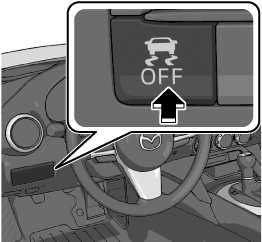
Press the DSC OFF switch again to enable the TCS/DSC/KPC operation.
TCS/DSC/KPC Operation Condition
|
Switch operation |
Indicator light |
TCS operation condition |
DSC operation condition |
KPC operation condition |
|---|---|---|---|---|
|
Press the DSC OFF switch continuously until a sound is activated. |
DSC OFF indicator light |
Operates at a vehicle speed of 6 km/h (3 mph) or slower |
Non-operation |
Non-operation |
|
Press the DSC-TRACK switch continuously until a sound is activated. |
DSC OFF indicator light DSC-TRACK indicator light |
Operation frequency is suppressed |
Operation frequency is suppressed |
Operation |
 is on
is on  is on
is on
-
If the engine is stopped while the TCS/DSC/KPC operation is canceled, the TCS/DSC/KPC becomes operational when the engine is started the next time.
-
When the TCS/DSC/KPC is on and you attempt to free the vehicle from being stuck, the TCS/DSC/KPC will activate. Depressing the accelerator will not increase engine power and freeing the vehicle from being stuck might be difficult. When this happens, turn off the TCS/DSC/KPC.
-
If the TCS/DSC/KPC is canceled and the following systems are operated, the TCS/DSC/KPC becomes operational.
-
Smart Brake Support (SBS)
-
Mazda Radar Cruise Control (MRCC)
-
Cruise Control
-
-
If the DSC OFF switch is pressed and held for 10 seconds or longer, the TCS/DSC/KPC operation can no longer be turned off even if the DSC OFF switch or DSC-TRACK switch is pressed. In this case, the DSC OFF switch or DSC-TRACK switch will operate normally when the vehicle power is switched ON again after being switched OFF.