How to Use the Rear View Monitor
Displaying the rear view monitor
Shift the shift lever/selector lever to the R position.
Images are displayed on the center display.
Viewing the screen
-
The images displayed on the center display are reversed left and right.
-
Screen brightness and contrast can be adjusted.
Set in the Mazda Connect “Settings” or consult an Authorized Mazda Dealer.


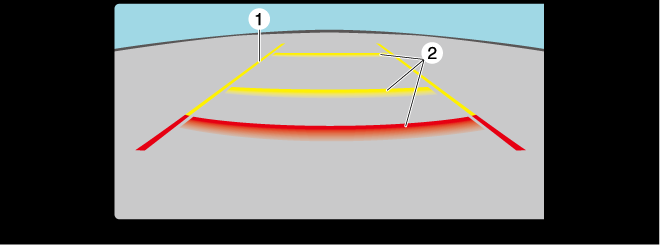
|
Indication |
Content |
|
|---|---|---|
|
1 |
Vehicle width guide lines (yellow) |
Indicates the approximate width of the vehicle. |
|
2 |
Projected vehicle path distance guide lines (red/yellow) |
These guide lines indicate the approximate distance to a point measured from the rear of the vehicle (from the end of the bumper).
|
System problem indication
In the following cases, there might be a problem with the system. Have the vehicle inspected by an Authorized Mazda Dealer.
-
"No camera signal." is displayed on the center display.
-
The display on the center display does not switch to the camera image even if the selector lever is shifted to the R position.
-
A portion of the display on the center display is black.