How to Perform Charging
It can be charged with a maximum of 7.2 kW of power.
The charging time for a SOC of 0 % to 100 % is about 2.5 hours (7.2 kW).
For charging, the charging timer function can be used to charge automatically from start to finish.
Refer to Convenient Ways to Use of Charging on page Reference (Search).
Installation of charging equipment is required for 7.2 kW normal charging. Consult an Authorized Mazda Dealer for details.
If a power outage occurs while charging, remove the charge plug and the charge connector and start charging from the beginning again.
Make sure that no water has accumulated in the charge connector and the charging port before charging. If any foreign matter enters the charge connector or the charging port, do not start charging and consult an Authorized Mazda Dealer.


-
Switch the vehicle power OFF.
-
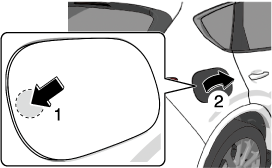
-
Open the charging port cap.
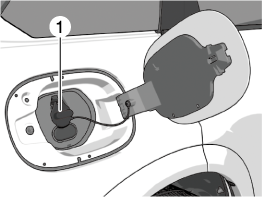
1 Charging port cap
-
Connect the charge plug to the outlet.
-
Connect the charge connector to the charging port.
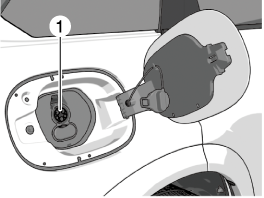
1 Charging port
Charging starts after connection is completed.
When the charging timer is set, charging does not start even if the charge connector is connected. When you prefer to start charging immediately, use the charging timer cancellation function.
Make sure to lock all the doors before leaving the vehicle while charging.
-
Unlock the doors before disconnecting the charge connector.
When the doors are unlocked, charging is stopped and the charge connector is unlocked.
-
After unlocking the doors, wait a few seconds and then remove the charge connector.
If the charge connector is removed without unlocking the doors while charging, or if the charge connector is removed immediately after unlocking the doors, sparks may occur and damage the exterior of the charge connector.
To prevent sparks, change the “Charge Connector Lock” setting to a setting other than “Off”.
After locking the doors again or about 30 seconds have passed since the doors were unlocked, the charge connector will lock again and charging will resume.
-
Close the charging port cap.
-
Close the charging port lid.
-
Disconnect the charge plug.
Charge indicator
The illumination/flash pattern of the charge indicator can be checked using the labels on the charge lid.
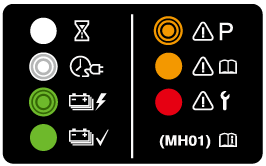
|
Charge indicator illumination/flash pattern |
Content |
|
|---|---|---|
|
— |
OFF |
Charging is possible. |
 (White) |
ON |
Turns on when waiting for starting to charge. |
 (White) |
Flashes slowly |
The brightness changes when the charging timer is set. |
 (Green) |
Flashes slowly |
The brightness changes during charging. |
 (Green) |
ON |
Turns on when charging is completed. Turns off after a certain period of time has passed since charging was completed. |
 (Amber) |
Flashes |
Flashes when the charging connector is connected and the selector lever is in a position other than P. Shift the selector lever to the P position. |
 (Amber) |
ON |
Turns on if there is a problem with the charging system when the charging connector is connected. Wait a few minutes then reconnect the charging connector. |
 (Red) |
ON |
Turns on if there is a problem with the charging system and the charging port lid is opened or the charging connector is connected. Have your vehicle inspected by an Authorized Mazda Dealer. |
Charge status screen
When the driver's door is opened while the charge connector is connected, the charging status is displayed in the instrument cluster.
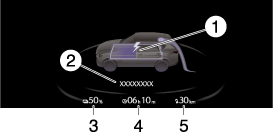
1 Charge status icon
2 Message
3 Remaining power of the high voltage battery (Displayed only when vehicle power is switched OFF)
4 Time to complete charging
5 EV maximum driving distance (Displayed only when vehicle power is switched OFF)
When charging is started, the charging status screen is displayed. The charging status screen turns off after a certain period of time passes or the doors or liftgate is locked. The screen is displayed again when the doors or liftgate is unlocked.