Vehicle Status Monitor
-
Select “Information” on the Home screen to display the vehicle status monitor.
-
Select “Vehicle Status Monitor”.
You can customize settings in the setup display as follows:
|
Item |
Explanation |
|
|---|---|---|
|
Serious Malfunction(s) (Some Models) |
Displayed if there is a serious problem. |
|
|
Important Notice(s) (Some Models) |
Displayed if there is recall information. |
|
|
Vehicle Warning Messages |
If there is a problem with the vehicle, information about the problem is displayed. |
|
|
Next Service |
The next maintenance period is displayed.
Date The date manually set by the customer is displayed.
Distance If “Next Service Date” is set to “Automatic” The “Distance Until Oil Change” content is displayed. If “Next Service Date” is set to “Manual” The traveled distance manually set by the customer is displayed. However, when any of the following conditions is met, the “Distance Until Oil Change” content is displayed. – You have not set the traveled distance. – “Distance Until Oil Change” is shorter than the traveled distance set by the customer.
(e-SKYACTIV EV) The traveled distance manually set by the customer is displayed. |
|
|
Engine Oil Level (Some Models) |
The current engine oil level can be measured. |
|
|
Maintenance Details |
Engine Oil Temperature (Some Models) |
The engine oil temperature is displayed. |
|
Distance Until Oil Change |
The traveled distance until engine oil needs to be replaced is displayed. |
|
|
Next Service |
The next maintenance period manually set by the customer is displayed. |
|
|
Tire pressure monitor (Some Models) |
The current tire pressure can be checked.*1 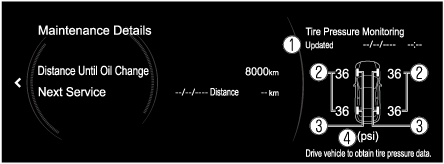
1 When tire pressures were last modified 2 Air pressure of each tire*2, *3 3 Tire pressure condition of each tire – When air pressure is low: Yellow color – When air pressure is correct: Blue color – When air pressure cannot be monitored: Black color 4 Tire pressure units*4 |
|
|
Battery Health (Some Models) |
The maximum capacity of the drive battery is displayed. |
|
|
Vehicle Maintenance Settings |
Next Service Date |
The method of setting the next maintenance can be selected from the following. – Automatic – Manual |
|
Set Next Service Date |
When “Next Service Date” is set to “Manual”, or for e-SKYACTIV EV, the date of the next vehicle maintenance can be set. |
|
|
Set Next Service Distance |
When “Next Service Date” is set to “Manual”, or for e-SKYACTIV EV, the distance until the next vehicle maintenance can be set. |
|
|
Reset Oil Change Distance |
The “Distance Until Oil Change” content can be reset. After replacing the engine oil, perform the reset (engine oil data resetting) of the recorded value in this item. |
|
|
Reset Service Interval |
The “Next Service” date and distance are reset. |
|
-
While the tire pressure monitoring system is learning the tire positions, such as immediately after a tire position has been changed, the tire pressure at the tire position prior to it being changed is displayed until the system completes the learning. For this reason, the tire pressures displayed for the tire positions may be different from the actual tire pressures at the tire positions.
-
The air pressure displayed on the display may be different from the value measured using an air pressure gauge.
-
The display units for the tire pressures can be changed.
-
To set the display unit for the tire pressures, set it using the Mazda Connect “Settings” or consult an Authorized Mazda Dealer.