Settings
Your vehicle is equipped with systems/equipment whose settings can be changed, and you can change the operation according to your preference.
The functions and contents that can be changed differ depending on the vehicle specifications.
Only items for which settings can be changed in the vehicle are displayed automatically.
Consult an Authorized Mazda Dealer for details.
Some settings may not be changed depending on the function because they are linked with other functions.
The contents of certain setting changes may change without notice due to vehicle software updates.


Setting change method
-
Tap
 on the navigation bar.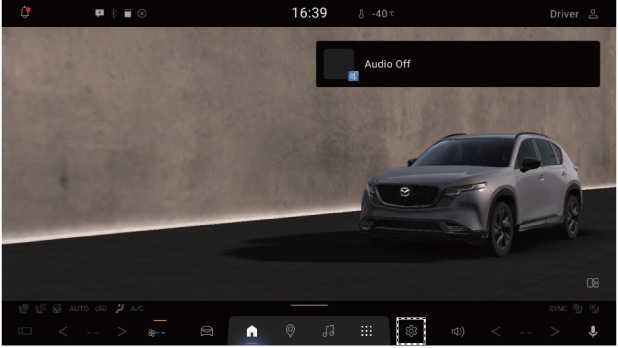
-
Select the setting item you want to change from the displayed contents.
-
Change the function settings.
Each item setting method
 ,
,  : ON
: ON
 ,
,  : OFF
: OFF
The slider bar can be adjusted by dragging it.

Setting item list
Displays
-
Active Driving Display
-
Instrument Cluster Display
-
Center Display
Climate Control
-
Rear Window Defogger
-
Occupant Comfort
-
Automatic Climate Control
Safety
-
Driver Assistance System
-
Safety Alerts
-
Collision Avoidance
-
View Monitor
-
Low Speed Detection & Alerts
-
Driver Emergency Assist
-
Speed Limit Alerts
-
Speed Alert
Vehicle
-
Doors
-
Exterior Lighting
-
Interior Lighting
-
Ambient Lighting
-
Experiences
-
Steering Wheel Controls
-
Turn Signals
-
Rain-Sensing Wipers
-
Automatic Folding Side Mirrors
-
Rear Seat Alert
-
Entry / Exit Assist
-
Wireless Charging Settings
-
Fuel Door Lock Delay
Bluetooth® & Phone Connectivity
-
Bluetooth
-
Device(s)
-
+ Pair New Device
-
Connection Preferences
Network
-
Wi-Fi Client Mode
-
Search for Available Wi-Fi Networks
-
Wi-Fi Details
-
Private DNS
Notifications*1
System Volume
-
System Sounds
-
Sound Experiences
-
Navigation Volume
-
Call Volume
-
Alarm Volume
-
Assistant Volume
Audio
-
Bass
-
Midrange
-
Treble
-
Listening Position
-
Balance & Fader
-
Automatic Level Control *2
-
Bose Centerpoint
-
Bose AudioPilot *3
Profile & Account *1
Location*1
Privacy *1
AccessiBility*1
Security*1
Apps*1
Assistant & voice*1
System Settings
-
Clock
-
Language
-
Units
-
Software Update
-
Storage
-
About
-
Legal information
-
System Information
-
User Settings Backup & Restore
-
Reset System Settings
Google*1
-
Items under the title have been omitted because they may change due to Android OS updates.
-
This function adjusts the volume of the sound inside the cabin depending on the vehicle speed.
Vehicles with Bose: The audio volume adjustment is not performed.
Vehicles without Bose: The volume adjustment including for audio is performed.
-
This is a function that uses a microphone to determine the surrounding situation and adjust the audio volume. (Vehicles with Bose)