What You Can Do With Connected Service

Amazon Alexa* TypeE System Limitations

Amazon Alexa is available using the onboard communication unit.
You can request destination settings by voice and use various Alexa functions (weather forecasts, news functions, shopping, Smart Home*1).
*1 Some Alexa functions require integration with Smart Home products when used.

  • (First time only) Setting the country where Amazon Alexa will be used is required. If it is not set, [Alexa] will not appear in the Mazda Connect menu. To set it up, go to [Settings] → [System Settings] → [Home Region], and set the country
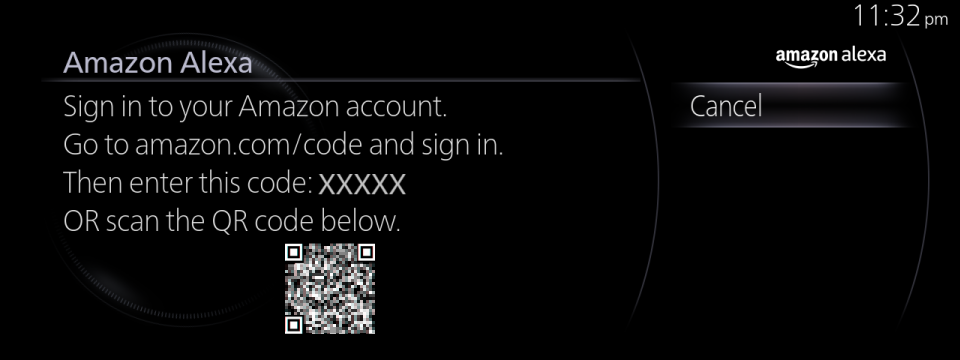
  • To use Amazon Alexa, you need to sign in to your Amazon account.
    (Sign In setting)
     1) Select [Settings] from the Mazda Connect home screen.
     2) Select [Alexa Settings]
     3) Select [Sign In]
     4) Follow the instructions on the Mazda Connect screen and sign in.
  • You can use Amazon Alexa by enabling either of the following functions.
     1) Connected Service function
      A subscription to Connected Service is required.
      If you have not subscribed, Amazon Alexa in the Connected Service function is unavailable.
     2) Wi-Fi client function
      For details on how to enable the function, refer to the following [NOTE].
      Communication fees are borne by the customer because communications are made using the customer’s mobile device.
  • Even if you stop the engine, you will still be signed in unless you sign out.
  • If you use high-capacity communications such as music streaming, you need to enable the Wi-Fi client function. It is not available through the Connected Service function.
  • When the Wi-Fi client function is enabled, simultaneous use with Apple CarPlay/Android AutoTM, or in-car Wi-Fi (if applicable) for wireless connection is not possible. To switch between audio sources, press the ♪ button on the commander switch.
  • Amazon Alexa can accept calls from another party, but Amazon Alexa cannot end the call. To end a call, press the hang-up button on the steering wheel.
  • When operating home appliances, Amazon Alexa-compatible products are eligible and equipment such as smart remote controls are required separately.
  • To avoid unauthorized use of your Amazon Alexa and Amazon accounts, always sign out of your Amazon account when renting out your car to others or selling it.
  • Wi-Fi client function setting method
     1) Select [Settings] from the Mazda Connect home screen.
     2) Select [Connectivity Settings].
     3) Select [Wi-Fi Client Settings].
     4) Enable [Wi-Fi Client Mode].
     5) Make a Wi-Fi connection with the device to be used from [Search for Available Wi-Fi Networks] or [Wi-Fi Protected Setup (WPS)].
  • Check examples of Alexa functions
     1) Select [Settings] from the Mazda Connect home screen.
     2) Select [Alexa Settings].
     3) Select [Things to Try!].
     Note that this does not cover all the functions.
  • Sign-out setting
     1) Select [Settings] from the Mazda Connect home screen.
     2) Select [Alexa Settings].
     3) Select [Sign Out].
     4) Follow the instructions on the Mazda Connect screen and sign out.

* Amazon, Alexa, and all trademarks related to them are trademarks of Amazon.com, Inc. or its affiliates.